
EZArrival: K12 Transportation
PathwiseEducation
4.85.00 Reviews
- Version
- 1.1.1
- Installs
- 10.00K
- Age Rating
- Everyone
Screenshots
Our Review of EZArrival: K12 Transportation
 Analysis by Appyee
Managing school transportation sounds simple until a bus is delayed, a child is collected by someone else, or a morning plan changes at the last minute. EZArrival: K12 Transportation is built for that narrow but important part of family life: helping parents or guardians manage a child’s school travel through a dedicated education app. I found its focus refreshing because it does not try to become a general family organizer. Its purpose is much more practical: keep transportation arrangements easier to follow and more secure.
That focused approach is also the main reason I would recommend looking at it. A school transportation tool has to earn trust differently from a casual timetable or messaging app. It deals with children, daily routines, pickup decisions, and information that families understandably want handled carefully. My view is that EZArrival is most appealing when a school or district already uses it as part of its transportation process. It is less useful as a standalone download if your child’s school has no connection to the service.
What EZArrival is really trying to solve
EZArrival comes from Pathwise and sits in the education category rather than the broader productivity space. That distinction matters. The app is not simply a digital calendar where you type in a bus route. It is intended to support the relationship between a K-12 family and the school transportation process, so its value depends on how well it fits the arrangements already established by the school.
I like this kind of specialization. Parents often end up combining school emails, paper notices, text messages, phone calls, and calendar reminders to keep transportation straight. That patchwork can work for ordinary days, but it becomes fragile when a child has an appointment, a different pickup person, or a change to the usual afternoon plan. A purpose-built app has the potential to put those decisions in one place instead of leaving them scattered across several channels.
The app is free, carries an Everyone age rating, and has reached over ten thousand installs. Its average score is 4.8 from around two hundred ratings, which suggests that the people who have rated it generally find the experience useful. I treat that reception as encouraging rather than conclusive. Transportation software is highly dependent on local school procedures, so a smooth experience for one family can still differ from another family’s experience in a different district.
The current release is version 1.1.1, and it runs on Android 7.0 or later. That gives it a fairly broad reach, including older Android phones that may still be perfectly adequate for a parent’s daily needs. The release date is March 17, 2026, so I would still approach it as a relatively young product and pay attention to how consistently it develops as more schools and families use it.
Trust starts with the situation, not the interface
When an app concerns school transportation, I do not judge it only by whether its screens look tidy. I first ask whether the app gives me a clear reason to use it, whether I understand who is responsible for the information, and whether I can tell when I am making a meaningful change. EZArrival’s connection with Pathwise gives the product a clear identity, but the practical trust relationship still involves the school or transportation organization using it.
That is why I would not treat the app as a replacement for every official school communication. If a school sends a direct notice about a route, a closure, or a special pickup procedure, that notice remains important. The app can make transportation management more convenient, but families should continue checking the school’s established channels when a situation is unusual or urgent.
For me, the strongest trust signal is the app’s narrow purpose. A tool designed around K-12 transportation is easier to evaluate than a general platform that mixes unrelated services and asks families to make sense of a large amount of information. The narrower scope can reduce confusion, provided the app clearly shows what action is being taken and which child or transportation arrangement it affects.
Controls that matter in a child’s daily routine
The most useful way to approach EZArrival is to think in terms of decisions rather than notifications. A parent may need to know what the normal transportation plan is, recognize when the plan has changed, and communicate an exception without creating ambiguity. Those are different tasks, and a good workflow should make each one understandable instead of presenting a long stream of messages.
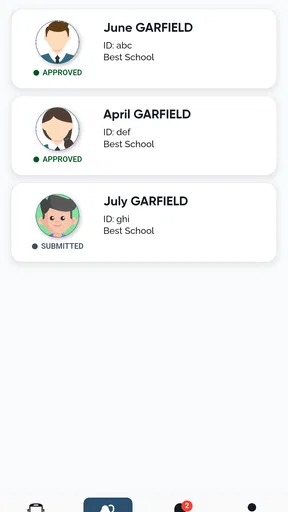
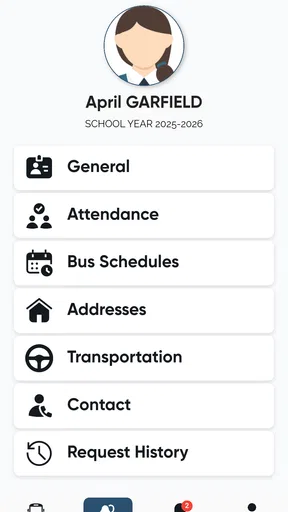
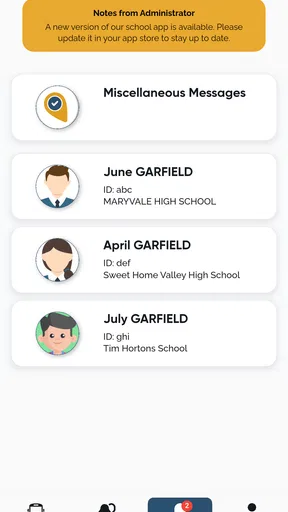
Before relying on the app, I would take a few minutes to inspect every visible account and child-related setting. Check which student profile is selected, review the transportation details shown, and look for any place where a pickup or arrival choice can be changed. This is not busywork. In a family with more than one child, a wrong profile selection is exactly the kind of small mistake that can create a large practical problem.
I would also use the first few days as a verification period. Compare what EZArrival shows with the school’s existing transportation information. If the route, timing, or arrangement looks different, ask the school rather than guessing. That comparison is one of the most valuable habits with any school transportation app because it separates a genuine change from an account setup issue.
My practical rule is to confirm the child, the day, and the requested action before saving anything. It takes only a moment, but it is more reliable than tapping quickly through a familiar routine. This is especially important when a parent is handling transportation while distracted by work, younger children, or a rushed morning.
Where privacy and security deserve extra attention
Transportation information is sensitive even when it looks ordinary. A child’s school, daily travel pattern, pickup arrangement, and family contacts can reveal more than a typical calendar entry. I therefore prefer to use EZArrival only on a phone protected by a screen lock, and I would avoid leaving the account open on a shared device. Those are simple safeguards, but they matter because physical access to a phone can be as relevant as an online account setting.
I would also resist the temptation to share screenshots of transportation screens in family group chats or social networks. A screenshot can include names, school details, or timing information that was intended only for the people responsible for the child. If another caregiver needs the information, it is better to share only what is necessary and to use the school’s accepted process for changing arrangements.
During installation and account setup, I would read each permission or access request in context and allow only what is necessary for the app’s operation. I would not assume that a permission is harmless simply because the app is educational, and I would not assume that denying a request makes the app unsafe. The useful question is whether the request is clearly explained and whether I understand the consequence of accepting or declining it.
The same caution applies to account recovery. Parents should use a reachable email address or phone method, keep credentials private, and avoid storing a password where a child or casual visitor could access it. If the app offers account controls, review them periodically rather than treating setup as a one-time task. Families change, children move schools, and old access should not remain active longer than necessary.
A realistic morning with the app
Imagine a weekday when a child normally travels home by school transportation, but a grandparent needs to collect them instead. The useful workflow is not merely receiving a reminder. The parent needs to identify the correct child, understand the normal plan, make the exception through the approved process, and know that the change has been recorded. If EZArrival supports that process for the school, it can replace several uncertain messages with one more deliberate action.
I would handle that change before the morning becomes hectic. After making it, I would check for a visible confirmation and keep the school’s contact method available in case the request needs approval or clarification. I would not rely on an unexplained status label or assume that pressing a button automatically changes what staff or transportation personnel will do. The safest habit is to distinguish between submitting a request and receiving confirmation that the request is accepted.
This is also where the app’s limits become clear. No transportation app can remove the need for human judgment when a child is absent, a bus is unexpectedly delayed, a caregiver is late, or an emergency affects the normal plan. EZArrival may organize the relevant process, but families still need a backup plan and a way to contact the school when circumstances fall outside the usual workflow.
How it compares with ordinary alternatives
The usual alternative is a mixture of school notices, a paper calendar, phone calls, and general messaging apps. That combination is flexible, but it places the burden on the parent to remember which channel contains the latest information. It also makes it harder to distinguish an official transportation change from an informal message between caregivers.
A general calendar is useful for recurring reminders, but it usually cannot represent the difference between a normal transportation plan and a one-day exception in a way that the school can act on. A messaging app is better for conversation, yet conversations can become difficult to search and may not provide a clear record of the final decision. EZArrival’s advantage is its purpose: it is aimed at the transportation relationship rather than merely reminding a parent that a bus exists.
The trade-off is flexibility. A calendar can be customized for almost anything, while a school transportation app may only be useful within the procedures supported by the participating school. If your family has complicated arrangements involving several caregivers, multiple schools, or frequent off-campus activities, you may still need a calendar and direct communication alongside it.
I also would not compare it with a live navigation app as if they served the same purpose. Navigation tools are designed for roads and journeys, while EZArrival is about managing a child’s school transportation arrangement. A map can help estimate travel, but it does not replace the school’s process for identifying who is responsible for a child at pickup.
Who will benefit most, and who should wait
EZArrival is a strong candidate for parents and guardians whose children use school transportation and whose school has adopted the Pathwise workflow. It should also suit families who want transportation decisions separated from general school chat, especially when several adults share responsibility for afternoon pickup. The free price removes an obvious barrier to trying it, assuming the school’s process supports it.
I would be more cautious if you are downloading it without any instruction from the school. A transportation app cannot create a route or enrollment relationship by itself. If your school does not use the service, the app may offer little practical value no matter how polished the interface feels.
It may also be the wrong fit for a family that wants extensive customization, broad route planning, or one dashboard for every school activity. Its strength is concentration on transportation, not being an all-purpose family management system. In that situation, a school portal combined with a calendar may be more adaptable, even if it is less elegant.
Families who share devices should pay particular attention to account separation and logout habits. A parent may find the app convenient, but convenience should not mean that every person using the phone can open child-related information. I would rather spend a few extra seconds checking the active account than make transportation details casually available.
Questions I would settle before relying on it
One practical question is whether a parent can use the app without a school invitation or matching account. I would answer that by checking the school’s instructions first. Because the app is designed around K-12 transportation management, the school or district’s setup is likely to determine whether the download leads to a usable account or simply an incomplete starting point.
Another question is whether it can replace calls to the school. I would not treat it that way. Use the app for the routine actions it clearly supports, but keep the official contact route for urgent changes, unclear confirmations, absences, and anything involving immediate safety.
Parents may also wonder whether an older phone is suitable. The Android requirement is 7.0 or later, so a device running that version or a newer one meets the stated operating-system baseline. Even then, I would keep the phone updated where possible and make sure there is enough storage and a dependable connection for normal account use.
For a family with multiple children, I would verify each profile independently rather than assuming that one transportation choice applies to everyone. Different children can have different schools, routes, or dismissal arrangements. The extra check is worthwhile because the most serious errors in family apps often come from applying a correct action to the wrong person.
Finally, I would ask what happens when the app and a school message disagree. My answer is to pause and confirm with the school. A transportation decision affects a real child, so speed should not come at the expense of clarity. The app is most valuable when it makes the approved process easier to follow, not when it encourages parents to guess which source is current.
My cautious verdict on EZArrival
After looking at EZArrival as a transportation tool rather than a generic education download, I see a sensible product for a specific audience. Its focus on K-12 travel can reduce the confusion created by scattered reminders and informal messages, and its free availability makes it easy for eligible families to consider. The high average rating and growing install base are positive signs, while the Everyone rating makes the app approachable for family use.
My recommendation comes with an important condition: use it as part of the school’s established transportation system, not as an independent source of truth. Confirm profiles, read each account choice carefully, protect the phone, and keep a direct school contact available for unusual situations. Those habits matter as much as the app itself because transportation involves decisions that cannot be safely reduced to a notification.
For families already connected to Pathwise through their school, EZArrival is worth trying as a focused, practical layer for daily transportation management. For everyone else, I would wait for clear school guidance before building a routine around it. That is not a criticism of the app; it is the realistic boundary of a service whose usefulness depends on the transportation network behind the account.
Verdict
Strengths of EZArrival: K12 Transportation
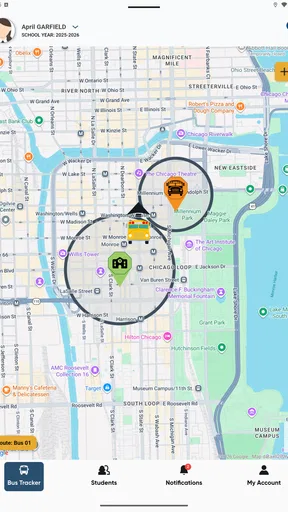
- Real-time bus tracking helps families plan pickups and drop-offs.
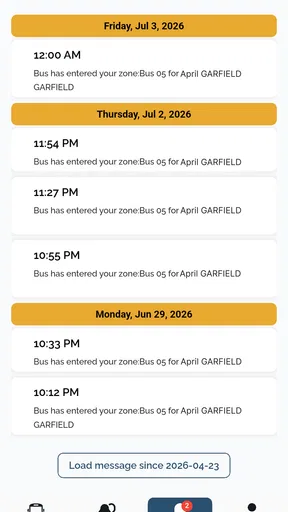
- Push notifications can alert parents about delays or route changes.
- Designed specifically for school transportation coordination.
- Supports clearer communication between schools and families.
- Useful for checking transportation details from a mobile device.
Limitations of EZArrival: K12 Transportation
- Availability depends on the school district using the EZArrival platform.
- Some features may require a parent or guardian account invitation.
- Location updates can be delayed by weak GPS or mobile connectivity.
- The interface may feel limited outside transportation-related tasks.
- Notifications may be easy to miss if phone permissions are disabled.
Similar Picks in This Category
View All
Duolingo: Language Lessons
Duolingo4.7

Google Classroom
Google LLC2.8

Unacademy: Learn & Crack Exams
Unacademy3.2

Bible App for Kids
Life.Church4.4

Cake - Learn English & Korean
Cake Corp.4.7

Brainly: AI Homework Helper
Brainly4.5
Frequently Asked Questions
What is EZArrival: K12 Transportation used for?
EZArrival: K12 Transportation is designed to help schools, districts, families, and authorized caregivers manage student transportation information. Depending on the school’s setup, parents may be able to view bus routes, stop details, pickup and drop-off times, service alerts, and arrival updates. The available tools can vary by district, so the app’s usefulness depends on whether your child’s school officially supports the platform.
How do I sign in to EZArrival: K12 Transportation?
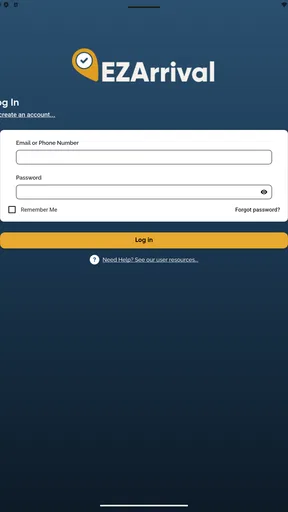
You generally need an account connected to your child’s school or school district before using EZArrival: K12 Transportation. Sign-in details and registration instructions may be provided by the transportation department, school administrator, or district communication system. If your child or route does not appear after signing in, confirm that you used the correct email or credentials and contact the school rather than creating multiple accounts.
Can parents track a school bus in real time with this app?
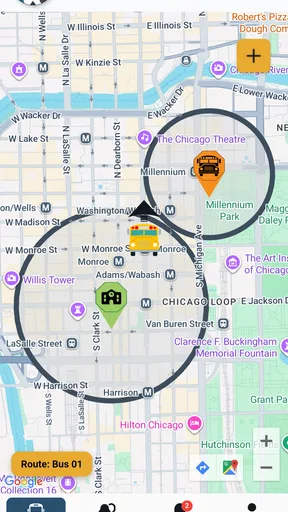
EZArrival: K12 Transportation may provide bus location, route progress, or estimated arrival information when those features are enabled by the participating school district. Real-time tracking is not guaranteed for every account, route, or vehicle, and displayed times can change because of traffic, weather, driver updates, or technical limitations. Always treat the app as a helpful estimate and follow the school’s transportation instructions.
Does EZArrival: K12 Transportation work with every school or district?
No. EZArrival: K12 Transportation is intended for schools and districts that have adopted and configured the service. Installing the app alone does not guarantee access to transportation data. Before downloading, check whether your child’s school uses EZArrival and whether your district has provided activation instructions. Features, supported routes, notifications, and account access may differ significantly between participating organizations.
What should I do if route information or notifications are missing?
If your route, student profile, bus details, or notifications are missing, first check that notifications and location permissions are enabled when required, then confirm that the app is updated and that you are signed in with the correct account. Information may also be unavailable if the district has not published the data. For persistent problems, contact your school or transportation office because they control most account and route information.
